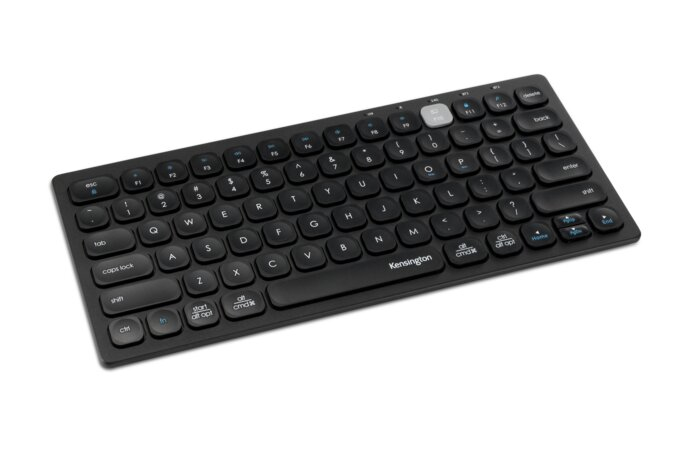
Description by backtotheoffice
Pair multiple devices & switch with a click Wireless keyboard to-go for when you're on the go Assign custom Hot Keys to your favorite apps Battery type: AAA Device interface: Bluetooth Pair multiple devices & switch with a click Connect it up with three different devices at once. Enjoy wide compatibility and easy pairing, as a click is all you need to switch between smartphones, tablets and other devices paired with the Samsung Smart Keyboard Trio 500.Wireless keyboard to-go for when you're on the go Always be ready to achieve.
Compact, slim and tastefully designed yet packed with special functions for a boosted performance, the wirelessly connectable Samsung Smart Keyboard Trio 500 delivers a comfortable typing experience wherever you are.Assign custom Hot Keys to your favourite apps Have shortcuts to the apps that you use the most and enjoy one-click access using 3 Hot Keys.
Whether it's your favourite content streaming app or your most frequently used utility app, launching them is always a Hot Key away.Enter into DeX for productivityBy accessing DeX via the Samsung Smart Keyboard Trio 500, reaching a desktop-like performance and productivity becomes a reality you can manifest from anywhere. Work with multiple windows at once, efficiently respond to messages and emails on one screen and achieve beyond the boundaries of devices.Step 1.
Connect via Bluetooth Pairing it with your mobile phone, tablet or other devices takes just a few simple steps. First, turn the power button on and long-press the Bluetooth key for instant recognition.Step 2. Click on the pop-up Once the easy-pairing pop-up appears on your devices screen, simply click on it.
You can pair up to three devices at once.Step 3. Enter the 6-digit key Enter in the 6-digit key from the easy-pairing pop-up. This will finish pairing your device with the keyboard securely.Step 4. Heres your keyboard to-go Thats it. The Samsung Smart Keyboard Trio 500 is ready to help you boost your productivity.
Keyboard Country of origin China Bluetooth version 5.0 Keyboard number of keys 79 Numeric keypad No Pointing device No Keyboard language English Keyboard layout QWERTY Device interface Bluetooth Connectivity technology Wireless Recommended usage Universal Design Product colour Black Backlight No Power Rechargeable No Battery technology Alkaline Number of batteries (keyboard) 3 Keyboard battery type AAA Power source type Battery Mouse Mouse included No Weight & dimensions Keyboard weight 410 g Keyboard dimensions (WxDxH) 281.08 x 16.35 x 127.42 mm Packaging data Package weight 524 g Package height 29.5 mm Package depth 290 mm Package width 133 mm Packaging content Number of products included 1 pc(s) Logistics data Commodity Classification Automated Tracking System (CCATS) 8471606000 manual pdf
Description by quzo
Pair multiple devices & switch with a click Connect it up with three different devices at once. Enjoy wide compatibility and easy pairing as a click is all you need to switch between smartphones tablets and other devices paired with the Samsung Smart Keyboard Trio 500.Wireless keyboard to-go for when you're on the go Always be ready to achieve.
Compact slim and tastefully designed yet packed with special functions for a boosted performance the wirelessly connectable Samsung Smart Keyboard Trio 500 delivers a comfortable typing experience wherever you are.Assign custom Hot Keys to your favourite apps Have shortcuts to the apps that you use the most and enjoy one-click access using 3 Hot Keys.
Whether it's your favourite content streaming app or your most frequently used utility app launching them is always a Hot Key away.Enter into DeX for productivityBy accessing DeX via the Samsung Smart Keyboard Trio 500 reaching a desktop-like performance and productivity becomes a reality you can manifest from anywhere. Work with multiple windows at once efficiently respond to messages and emails on one screen and achieve beyond the boundaries of devices.Step 1.
Connect via Bluetooth Pairing it with your mobile phone tablet or other devices takes just a few simple steps. First turn the power button on and long-press the Bluetooth key for instant recognition.Step 2. Click on the pop-up Once the easy-pairing pop-up appears on your devices screen simply click on it.
You can pair up to three devices at once.Step 3. Enter the 6-digit key Enter in the 6-digit key from the easy-pairing pop-up. This will finish pairing your device with the keyboard securely.Step 4. Heres your keyboard to-go Thats it. The Samsung Smart Keyboard Trio 500 is ready to help you boost your productivity.